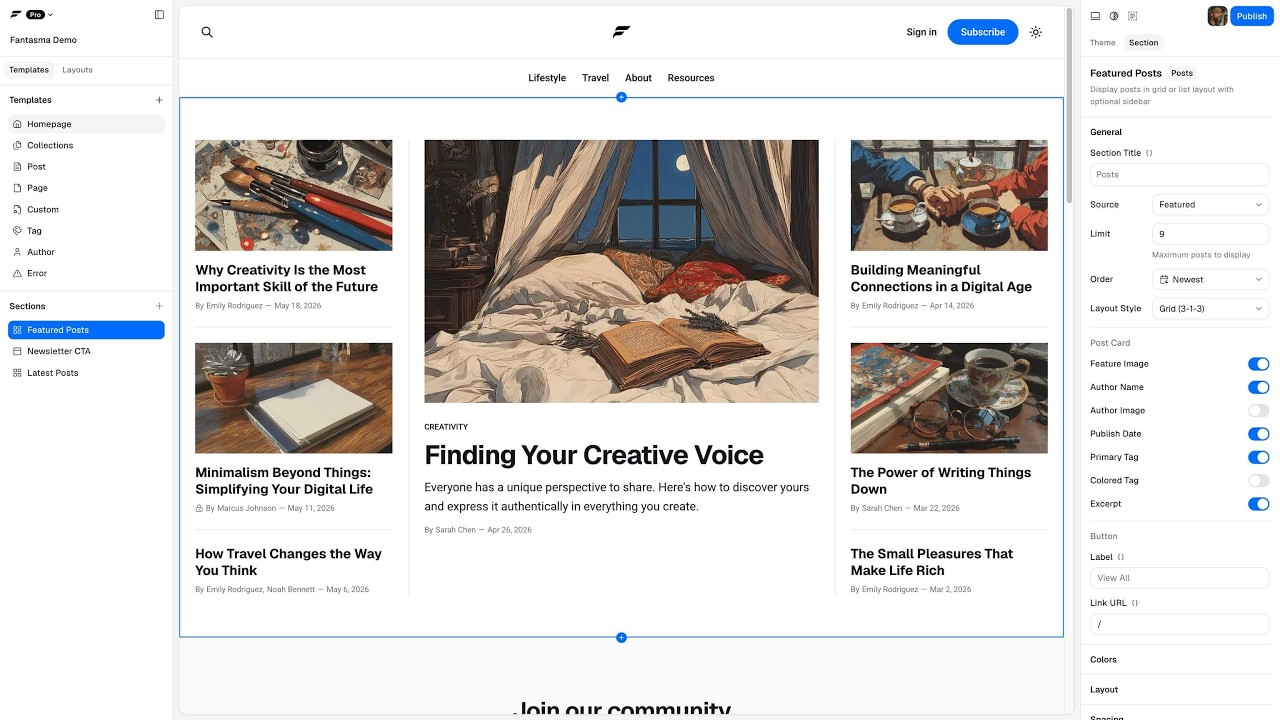
We’ve been building Fantasma, a visual Ghost theme builder in the style of Source. Pick templates, add sections, tweak spacing, colors, and fonts, and preview as you go. No coding required.
When the theme is ready, publish straight to your Ghost site in one step, or download a ZIP and install it yourself. You get normal theme files (Handlebars, assets, the works). Edit them for your own sites or hand them off for client work.
Free: theme builder, large preset library, theme ZIP download. Works without an account; projects save locally until you sign in for cloud sync.
Pro: one-click publish, live site preview, custom templates and color schemes, more cloud projects, media in exports, white-label output, and a few extra theme options. Details: https://www.fantasma.io/pricing
What’s next
We want Fantasma to grow into a broader visual Ghost theme builder, with more layout and visual variety beyond the Source look. That takes time and depends on how people use it today.
Fantasma is transforming Ghost—and you need to know why.
Gone are the days of being boxed in by rigid theme templates. With Fantasma, you design YOUR site, YOUR way—no coding required.
Here’s what changes everything:
Total design freedom without touching code
Front-end editing that actually works
Zero developer fees for those “quick tweaks”
A free plan that doesn’t feel like a trial
Whether you’re a seasoned developer or just starting with Ghost, this isn’t another tool to bookmark and forget. This is the shift that makes Ghost accessible to everyone.
The window is open now. Early adopters shape the future of this platform.
With the Ghost Pro new features and ability to edit theme code in the browser, how and what does Fantasma provide that exceeds that? Is there a way to ensure edits made in Fantasma are mobile responsive as well? Can we take an existing theme we have modified, export it, than import it into Fansama and continue to build it out and than push that to Ghost as an modified theme? One issue we are trying to solve is the ability to have a sort of private or paid channels where members can access, is that possible with Fantasma?
Ghost’s code editor and Fantasma serve different needs. Ghost is for editing theme code directly, while Fantasma is a visual builder for creating and styling theme without working in Handlebars, CSS, or JavaScript.
Fantasma themes are responsive, with desktop, tablet, and mobile previews available in the builder.
You can’t import an existing Ghost theme into Fantasma for visual editing. You can, however, export a Fantasma theme as a standard Ghost theme ZIP, upload it to Ghost, and continue editing the code there. Those changes won’t sync back to Fantasma.
Private and paid content is handled by Ghost. You can restrict posts to members, paid members, or specific tiers, while using Fantasma to design the theme and channel-like sections.
I really like the idea behind Fantasma and think it has a lot of potential. One thing I feel is still missing is more freedom to make themes truly different. Since it’s built on Source theme, whatever you create will naturally have a bit of a Source look to it, which can feel limiting.
It would also be nice to have some of the newer features that are increasingly becoming expected/standard, things like simple animation/transition options for sections, along with scroll-to-top, Add to Google, listen/read-aloud, font-size controls, bookmarks/save-for-later, and dedicated spaces for ads.
I think adding these kinds of features could really help Fantasma move from a Source-based visual editor into a much more powerful and genuinely flexible Ghost theme builder. Just sharing a few things I’d personally love to see.
Source was the starting point, and Fantasma already goes well past what Source gives you out of the box: custom templates, collections and routes, sections you can reorder and reconfigure, color schemes with per-section overrides, dark mode, an image lightbox, dropdown menus, etc… A lot of that came over from our Priority Vision themes.
Your main point is the one we are working on now. We are splitting the current sections into blocks, so a section stops being a fixed unit and becomes something you put together yourself. Once that lands, two Fantasma themes will not have to look alike. It’s a lot of work, so there’s no ETA yet.
One more thing on the roadmap, since so many people now work through AI agents. We plan to add an MCP server, so an agent can open a Fantasma project and edit content, work with sections and blocks, and change templates.
For the specific features you listed, the best place is our suggestions board at Suggest a Feature | Fantasma. You can post each one and upvote what is already there. We build what gets the most votes, so the votes set the order.
@PriorityVision Are you planning to ship any latest updates soon? I submitted a bug a few weeks ago on the features page but received no response. Are you still working on Fantasma?
Thanks for following up, and sorry your report went unanswered.
We don’t have a versioned release planned for the coming weeks. We’re working on Fantasma v2, which adds fully nested blocks, customizable sections, and MCP support for working with AI agents. That’s a big piece of work, and development runs through October and November.
Small bugs we fix right away, without a version bump or a changelog entry. The line you saw where the table of contents should be on locked posts is fixed in the app now. It appeared when a locked post had no headings visible to the reader, so the empty sidebar still drew its border. Please download the theme again and upload it to Ghost to get the fix.
For bugs in the future, the fastest way to reach us is the support email at Contact | Fantasma. You can also use the chat there, where our AI agent can help with common questions.
What if Fantasma had a canvas, like Shopify’s new Canvas?
We’ve been playing with an idea: all templates of your theme on one canvas. You pan and zoom around the whole site, edit any page right where it is, and switch to fullscreen when you want to focus on one.
It’s just an experiment for now. Would you use something like this?
I use another writing platform that has a canvas feature but they don’t force folk to use it. Many like it, however they also offer a grid and list view to suit individual preferences. It’s certainly a current more modern way of moving round boards so I’m all for it, as long as there’s a fall back to say ‘the classic’ mode as you have it now. Can’t fault anything you’re doing. More people should be using Fantasma. Nothing touches it. I wont touch a theme ever again after using this.
Fantasma looks amazing fr. i would love to use it in place of other themes as I can customize it. but for real use cases fantasma needs to focus on helping users build complete themes that they want including homepage, membership page, newsletter page, pricing page and more. I have not seen Shopify’s new Canvas but I do not think most users would care about this if you do not offer theme features that they really want or have suggested to you. for me personally, I will not be using this pan and zoom. I will def use fantasma if I can create a complete good looking theme with pages and features that I need or will actually use.
I think Angie that you need to give Priority Vision (Fantasma) a bit of slack. They built this platform from nothing, and as with anything built, it needs to evolve and that evolution starts with early adopters use cases and user feedback. It’s the users feedback that are helping Fantasma grow. If you decide to wait until it’s a perfect end product then you don’t get it. If you decide to criticise from the sidelines without getting into the builder, then you don’t get it. It will never be perfect for you.
So maybe actually use it to see what it can do, before you comment on what it can’t.
I was responding to the question, “It’s just an experiment for now. Would you use something like this?” My answer was that I personally wouldn’t use it in its current form, and I explained exactly why: I’d be interested in using Fantasma if it allowed me to build complete, good-looking Ghost themes with the pages and features I actually need. The pan-and-zoom functionality, on its own, isn’t a compelling use case for me.
You seem to have interpreted my feedback as criticism of the developers or a refusal to give the product a chance. Neither is what I said.
Let’s address your points:
“They built this platform from nothing… and that evolution starts with early adopters’ use cases and user feedback.” Exactly. That’s what I was doing. It’s called providing feedback.
“It’s the users’ feedback that are helping Fantasma grow.” Yes, and I gave specific, actionable feedback about what would make the product useful to me. Simply saying “looks great” wouldn’t have been nearly as helpful.
“If you decide to wait until it’s a perfect end product then you don’t get it.” I never said I expected a perfect product. I identified specific functionality that would make it useful for my needs. There’s a considerable difference between expecting perfection and explaining what would make a tool viable for your use case. In any case, you do not get to decide if a product is perfect for me or not. I do.
“If you decide to criticise from the sidelines without getting into the builder, then you don’t get it.” You know nothing about my experience with the builder, my requirements, or the features I need. You’ve made assumptions about all three and then responded to those assumptions rather than to what I actually wrote.
“It will never be perfect for you.” That’s for me to decide. I’m perfectly capable of evaluating a product against my own requirements, just as you’re entitled to evaluate it against yours. You should let other users decide for themselves what’s perfect for them.
The irony here is that you’re defending the importance of user feedback while criticizing me for giving it.
I acknowledged what I like about Fantasma, explained what’s missing for my use case, and identified what would make me want to use it. That’s constructive feedback, not an unreasonable demand for a perfect product.
Nobody is obligated to adopt a tool simply because its developers have worked hard on it, and nobody needs to pretend a feature is useful to them when it isn’t. A product can be impressive, promising, and worth supporting while still not meeting someone’s current needs. Providing specific and actionable feedback is actually how a product improves, in my opinion.
By all means, disagree with my assessment. But learn to respond to the feedback I actually gave rather than making assumptions about my experience, motivations, or expectations. And perhaps leave it to individual users to decide for themselves what works for them.
So maybe you can keep your opinion to yourself if you neither know what feedback other users are providing for their own specific use cases nor how a forum works.