I’ve got several containers of the latest version of ghost installed on my server (CoreOS VMs). All of them are reverse proxied through nginx. Some of them listen to
user1.mydomain.tld
user2.mydomain.tld
others are listening to
myotherdomain.tld/user1
myotherdomain.tld/user2
The url env variables for each blog are set accordingly.
All of them are on the internet and with Chrome ALL works as expected. I get past the login right into the editor. This is with Chrome on OS X as well as with Chrome on Win10. It also works with MS Edge on Win 10. It even works with Safari on IOS.
The problem is that, trying to do the same thing with Safari on OS X or the Win IE, I can’t get to the login page. The spinning circle pops up and will stay there. Accessing the public blog works fine though.
OSX is El Capitan
Win10 is the latest update
Did anybody come across the same problem and knows a fix for this? If not, I can provide more information as and when required.
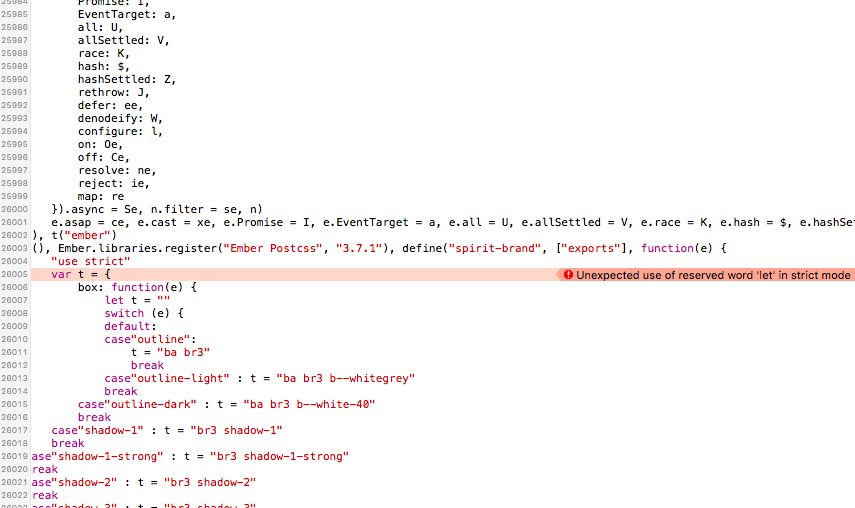
Hey @Carsten Sorry you’re having issues! Can you open Safari’s developer tools (right-click the page and choose Inspect Element) to see if there are any errors reported on the Console tab?
Thanks @Carsten that was exactly what I was looking for. Unfortunately I’m not able to reproduce the problem using Safari 11.1 on macOS High Sierra. Currently trying to test IE 11 on Win 8.1
These particular errors are resolved in master and will be released next Tuesday.
The fix allows the admin area to load in IE11 but unfortunately there are a number of other problems in that browser that may or may not get in the way of using the admin area effectively. If anyone is invested in using IE11 then PRs to resolve problems are very welcome That being said we’re likely to drop IE11 support in Ghost 2.0 so finding an alternative such as using recent versions of Edge/Chrome/Safari/Firefox or Ghost desktop is recommended.
 Sorry you’re having issues! Can you open Safari’s developer tools (right-click the page and choose Inspect Element) to see if there are any errors reported on the Console tab?

 That being said we’re likely to drop IE11 support in Ghost 2.0 so finding an alternative such as using recent versions of Edge/Chrome/Safari/Firefox or